Astrion V1.4.2 Release Notes
Broadlink IR binding, no-switch-mode AC support, UI enhancements, and stability fixes
Overview
Astrion V1.4.2 is a feature and stability release. It includes Broadlink IR entity binding (offline control), no-switch-mode AC support, UI/UX improvements, and system stability fixes.
✅ RosCard V1.4.2 Required: This firmware update requires RosCard V1.4.2 to function. Please update via HACS.
1. New & Extended Features
📡 Broadlink IR Entity Binding (Offline Control)
New support for binding entities created by the Broadlink IR Learner to TV Card buttons, enabling offline infrared control.
Configuration Steps:
- Enter the TV Card configuration interface
- In the key code binding section, select an entity created by the Broadlink IR Learner
- Set device type to Broadlink
- Select the specific key code under that entity
💡 Key Features:
• Offline Control: IR codes work even when the device is offline
• Flexible Configuration: Add custom IR codes as needed
• Full Guide: See Broadlink IR Learner Guide
❄️ No-Switch-Mode AC Support
- Previous limitation: AC required 3 attributes (Power, Mode, Fan Speed)
- V1.4.2 improvement: Any AC with temperature control can now be added
- Unsupported controls are automatically grayed out and non-interactive
- Improved mode and fan speed switching logic
2. UI & Display Enhancements
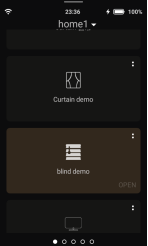
🪟 Blind Icon Differentiation
When a cover is set to "Blind" mode in RosCard, the list icon automatically switches to a blind-style icon. Quick action popups for blinds also display the blind-specific icon.
🖼️ TV Card Name & Icon Visibility Control
Two new toggles have been added to the TV card configuration interface: Show Name and Show Icon (both enabled by default). Card list view only — detail view unaffected.
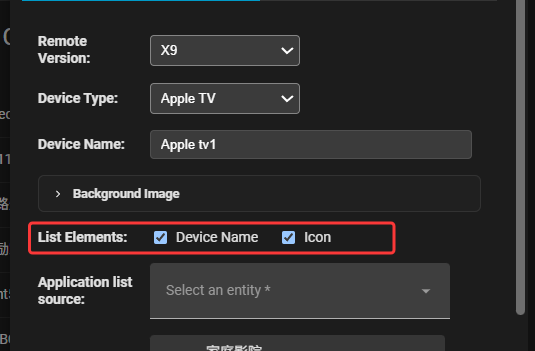
⚠️ Note: If both toggles are disabled and no background image is set, the card will appear empty — user-driven configuration.
3. Bug Fixes & Stability
☀️ Weather Card Fix
Fixed the weather card freeze/crash that occurred when data was missing. Improved data validation logic.
📝 Setup Wizard Label Fix
Fixed the "IIP" label in the setup wizard — now correctly displays "IP" with proper formatting.
Compatibility
This release requires:
- RosCard V1.4.2 — available via HACS
- Astrion Home Integration — latest version (required for Broadlink binding)
Known Issues
No known issues have been reported for this release. If you encounter any problems, please report them on the community forum.
How to Update
Astrion Remote (OTA)
- On your Astrion Remote, go to Settings → About
- Look for the Software Version section
- If an update is available, a red dot will appear next to the version number
- Tap the version number and follow the on-screen instructions
RosCard (via HACS)
- Open HACS in Home Assistant
- Navigate to Frontend
- Find RosCard and click Download
- Refresh your browser and restart Home Assistant if prompted
💡 Need more help? View the full Update Guide for detailed instructions.