
Design Note #001: Interfaces Should Reflect Behavior, Not Hardware
Good interfaces don't begin with technology. They begin with human behavior.
Every physical button is a promise.
It promises that pressing it will do exactly what the user expects.
When that promise breaks, even excellent hardware becomes confusing.
Over the past few weeks, some users have noticed that newer Astrion Remote units feature different shortcut button icons than earlier production models.
We'd like to clarify exactly what changed — and, more importantly, what didn't.
No Hardware Difference Between HA100A and HA100B
Some customers have asked whether the newer version is an upgraded model.
The answer is no.
Whether your remote is labeled HA100A (0127A) or HA100B (0127B), the hardware is exactly the same. There is no difference in CPU, memory, display, battery, charging hardware, IR hardware, wireless connectivity, performance, or firmware compatibility. Both versions receive the same firmware updates and support the same features.
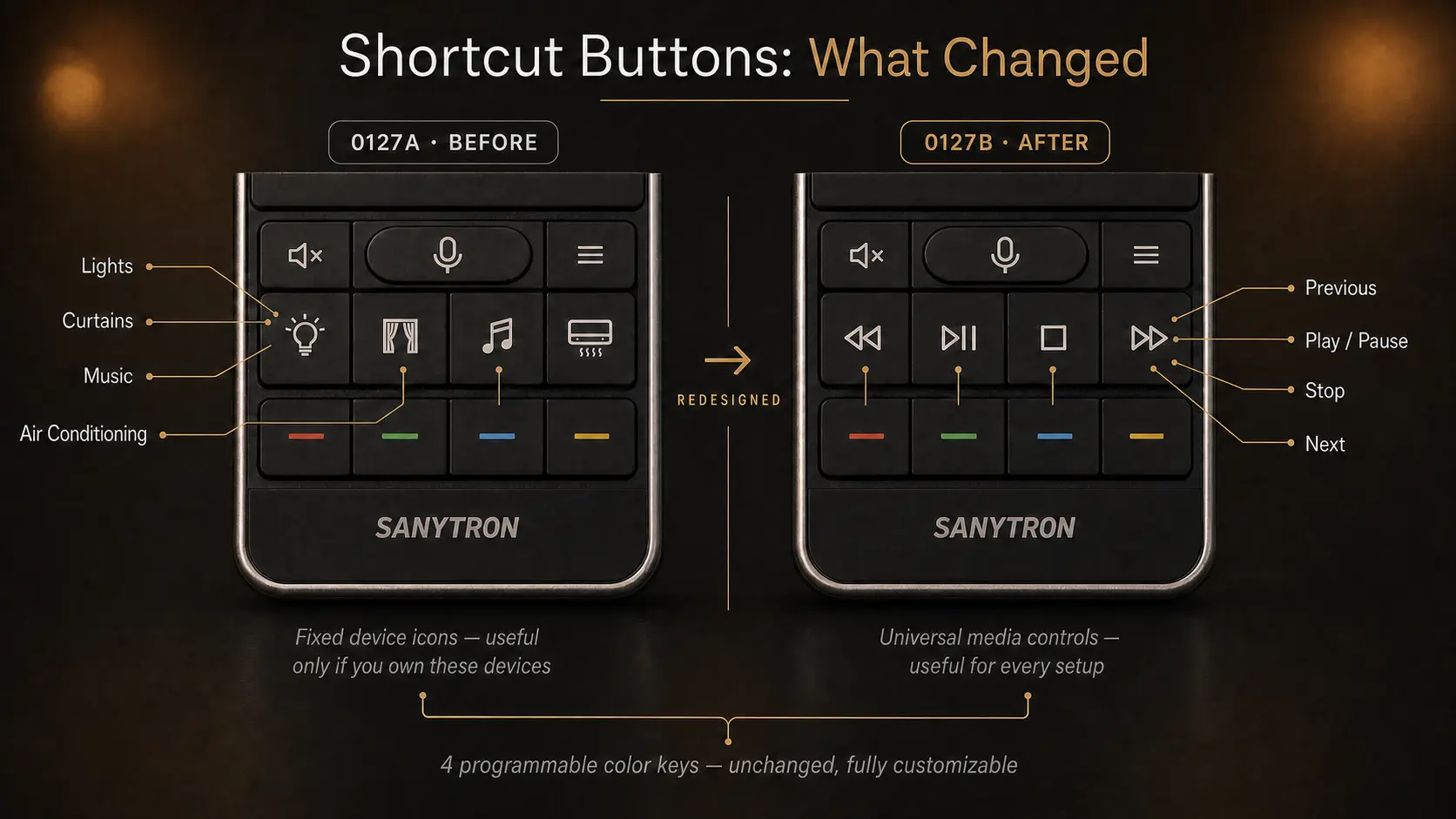
The only visible difference is the printing on the four shortcut buttons.
Why Astrion Remote Changed Its Shortcut Buttons
When Astrion was originally designed, we made an assumption. We assumed most Home Assistant users primarily wanted dedicated smart home controls. The original shortcut buttons were labeled with familiar household icons: Lights, Curtains, Music, and Air Conditioning.
At first glance, this seemed logical. A smart home remote should control smart home devices. But after several months of listening to feedback from our community, Why Device-Specific Buttons Didn't Work, we realized our assumption wasn't entirely correct.
What we learned after shipping thousands of remotes
Originally, we believed that Home Assistant users primarily wanted dedicated smart home buttons.
We were wrong.
Our community showed us something far more interesting.
Home Assistant users are incredibly diverse. Some have smart lighting throughout their home, motorized curtains, and multi-zone HVAC systems. Others focus almost entirely on media — Apple TV, Android TV, Kodi, Plex, Sonos, Music Assistant, and AV receivers. Very few people own exactly the same combination of devices.
This created an unexpected problem. If you don't own smart curtains, that Curtains button sits there unused, taking up valuable physical space. If you don't have a smart air conditioner, the Air Conditioning icon becomes meaningless. Many users immediately remapped those buttons to completely different functions — at which point the printed icon no longer matched what the button actually did. Several experienced users told us this felt confusing and unintuitive.
The mismatch between the icon and the function created unnecessary cognitive friction. A physical icon should describe a purpose—not a device.
Interfaces should reflect behavior, not hardware.
When a physical icon represents a specific device instead of a common behavior, it eventually becomes wrong for someone.
Why Media Controls Became the Better Default
One thing became very clear as we reviewed the feedback: almost every Astrion owner controls media. Whether it's streaming video, listening to music, or navigating a home theater setup.
Media playback is one of the very few experiences shared by almost every smart home, regardless of brand, platform, or automation style.
That made media controls the strongest common language a remote could speak.
That's what made it the right default.
Design Principle #01
A physical icon should describe a purpose, not a device.
That insight led us to redesign the shortcut buttons using familiar multimedia symbols: Play / Pause, Previous, and Next. These icons are universally understood regardless of platform or device. You don't need to own a specific piece of hardware to find them useful. You just need to consume media, which nearly everyone does.
Scene control hasn't gone anywhere
Some users wondered whether this change means Astrion is becoming "less smart home focused." Absolutely not. Scene shortcuts remain an essential part of the remote.
Rather than using fixed device icons for scenes, we encourage users to take advantage of the four programmable color buttons. You might assign Red to Away Mode, Green to Home Mode, Yellow to Movie Night, and Blue to Good Night — or map them to any automation, script, scene, or Home Assistant service you use daily. These buttons remain completely customizable, just as they've always been.
A more natural division of responsibilities
This update reflects a clearer design philosophy for Astrion. Physical buttons handle high-frequency actions that users perform without looking — Play / Pause, Previous / Next, volume, navigation, and favorite shortcuts. The four color buttons launch automations, scenes, or scripts with one press. The touchscreen, powered by RosCard, manages complex interactions requiring visual feedback: lighting control, climate adjustment, cameras, dashboards, security, media browsing, and device status.
Each interaction method now has a clearer purpose.
Buttons for speed.
Screen for depth.
Color keys for personalization.
Learning from the community
This update wasn't inspired by competitors or industry trends. It was inspired by our own users — Home Assistant enthusiasts, professional installers, and experienced automation users around the world who shared how they actually use Astrion in their daily lives.
Those conversations helped us realize something fundamental: Astrion shouldn't assume what devices people own. Instead, it should provide a flexible platform that adapts to every installation. The remote should disappear into the user's workflow, not force the user to adapt to the remote.
Astrion will continue evolving
Design is never finished.
Every firmware release, every RosCard update, and every hardware revision teaches us something new.
Astrion isn't a fixed product.
It's a conversation between our engineers and our community.
Every discussion, every bug report, every disagreement, and every suggestion helps shape what comes next.
We're grateful to everyone who has challenged our assumptions.
Design is never finished.
Every firmware release teaches us something.
Every hardware revision teaches us something.
Every community discussion teaches us something.
Astrion isn't a finished product.
It's an ongoing conversation between engineers and the people who use it every day.
We'll keep listening.
We'll keep learning.
We'll keep building—together.
Design Note #001 — Why We Replaced Device Icons with Media Controls